Sign in with Amazon
Sign in on Amazon’s page inside the app. Amazon session cookies stay on your computer and give CloudSweep access to your library. Your password is not sent to our servers.
Amazon Photos video cleanup · Windows app
Find huge videos, forgotten clips and storage you could reclaim — without scrolling through thousands of files one by one. Find out for free.
Downloads the desktop app for Windows 10/11 (64-bit).
Free scan. No credit card.
Nothing deleted during a scan. You confirm cleanup.
Is CloudSweep safe?By Burmarsh Systems Ltd · Registered UK company.
Independent of Amazon.
Less scrolling. More deciding.
CloudSweep brings size, date and cleanup clues into one desktop workflow.
The free scan comes first
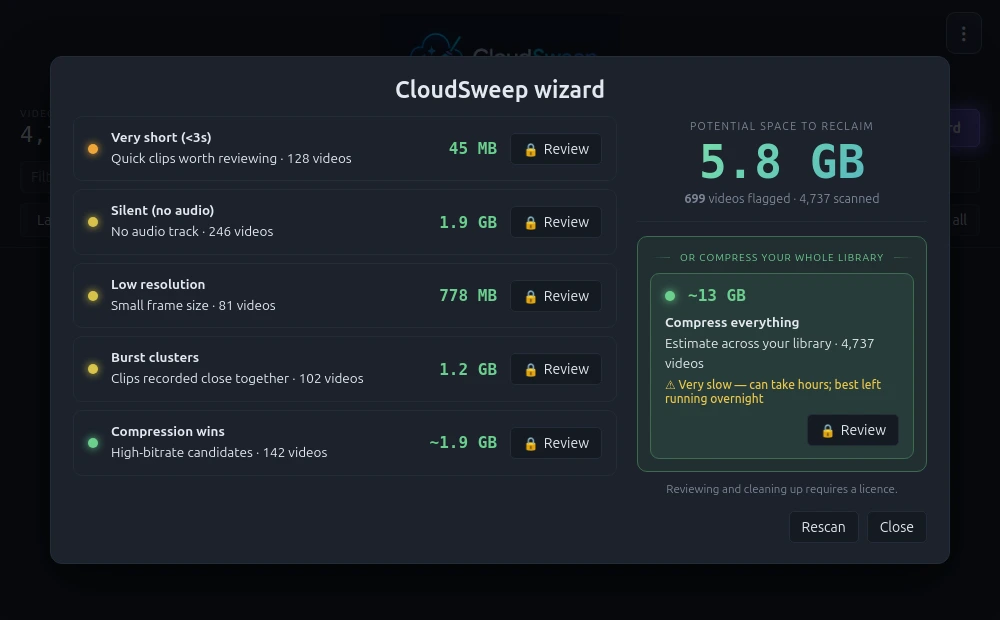
Install CloudSweep, sign in with Amazon and run the Wizard.
See potential savings free. Browse manually, or open detailed Wizard results with Pro.
Bulk delete free, or back up and compress with Pro. You confirm changes.
No purchase needed to find out
US$0
Browse, scan and bulk delete.
US$3.99 / year
Detailed results, backup and compression.
| What’s included | Free | Pro |
|---|---|---|
| Browse all videos; sort by size or date | Included | Included |
| Bulk select & move videos to the Amazon bin | Included | Included |
| Full Wizard scan & potential savings summary | Included | Included |
| Open detailed Wizard video results | — Not included | Included |
| Back up selected videos | — Not included | Included |
| Compress selected videos | — Not included | Included |
Pro is billed annually in US dollars, tax included. Renews automatically until cancelled. Cancel in the app; access continues until the end of your paid period. Billing terms.
Try the scan first. Buy Pro inside CloudSweep.
Before you connect your library
Here’s how sign-in, access and cleanup work.
Read the privacy policy ↗Sign in on Amazon’s page inside the app. Amazon session cookies stay on your computer and give CloudSweep access to your library. Your password is not sent to our servers.
The app reads metadata and downloads thumbnails and videos directly from Amazon. Your library is not sent to our servers. Anonymous usage counts are sent separately.
You confirm cleanup actions. Deletions go to Amazon’s bin. Compression uploads smaller replacements to Amazon and bins the originals. Check the bin before emptying it.
Made by Burmarsh Systems Ltd (NI743398), registered in Northern Ireland. Independent of Amazon; not affiliated or endorsed.
A few practical details
Yes. Scan your full video library and see potential savings without a credit card. Detailed Wizard video results require Pro.
The estimate is potential savings, not reclaimed space. Categories can overlap. Results depend on your library and cleanup choices; flagged videos may still be worth keeping.
US$3.99 annually, tax included, renewing until cancelled. Buy in the app; cancel through Manage subscription. Pro stays active until your paid period ends.
Currently Windows 10/11 (64-bit) only. Email hello@cloudsweep.app to register interest in Mac or Linux.
Your first step costs nothing
Downloads CloudSweep for Windows 10/11 (64-bit).
No credit card. Nothing deleted during the scan. Is it safe?